what is the best M4 MacBook, AIR 13 and 15 or Pro 14 or 16 inches?
Apple’s 2025 MacBook lineup offers a range of options for different users, from the lightweight MacBook Air M4 (13-inch and 15-inch) to the more powerful MacBook Pro M4 (14-inch and 16-inch).
This article provides a detailed comparison of these four models that can be powered by the recent macOS Sequoia, focusing on design, performance, display, battery life, and more, to help you choose the right MacBook for your needs. Each model caters to distinct user profiles, whether you’re a student, professional, or creative, and I’ll break down the key differences to guide your decision.
Overview of the 2025 MacBook M4 Models
- MacBook Air 13-inch M4: Launched in March 2025, this model is Apple’s most portable laptop, starting at $999 with the M4 chip, ideal for everyday tasks and travel.
- MacBook Air 15-inch M4: Also launched in March 2025, this larger Air starts at $1,199, offering a bigger screen and enhanced audio for users needing more workspace.
- MacBook Pro 14-inch M4: Released in October 2024, starting at $1,599, this model balances portability and performance, with options for M4, M4 Pro, or M4 Max chips.
- MacBook Pro 16-inch M4: Also released in October 2024, starting at $2,499, this is Apple’s most powerful laptop, equipped with M4 Pro or M4 Max chips for professionals.
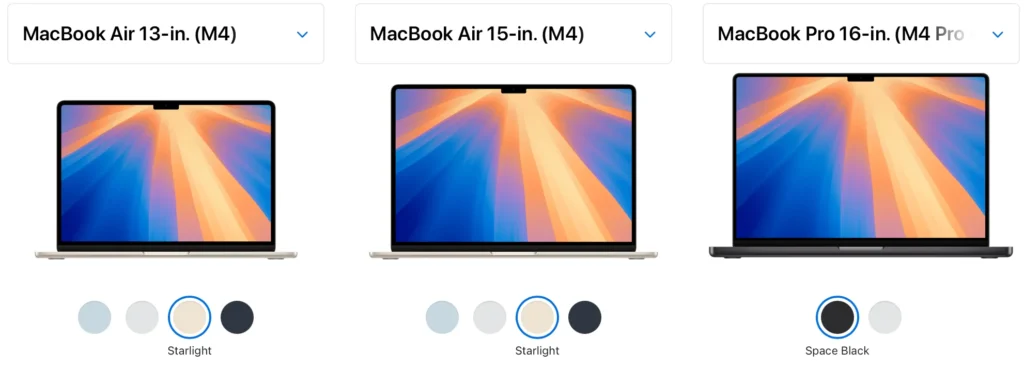
1. MacBook Design and Portability
The MacBook Air models prioritize lightweight design, while the Pro models are slightly heavier due to their advanced cooling and hardware.
- Dimensions and Weight:
- The 13-inch Air is the smallest and lightest, making it perfect for frequent travelers.
- The 15-inch Air, while larger, remains slim and lighter than the Pro models.
- The 14-inch Pro offers a good balance of size and power, while the 16-inch Pro is the largest and heaviest, better suited for stationary use.
- Build and Colors:
- Air models come in four colors: Silver, Starlight, Midnight, and Sky Blue (introduced with M4).
- Pro models are available in Silver and Space Black, giving them a more professional aesthetic.
- Ports:
- Air models have two Thunderbolt 4 ports, a MagSafe 3 charging port, and a headphone jack.
- Pro models add more connectivity with an HDMI port, SDXC card slot, and a third Thunderbolt port (Thunderbolt 5 on M4 Pro/Max configurations).
Table 1: Design and Portability
| Feature | MacBook Air 13-inch M4 | MacBook Air 15-inch M4 | MacBook Pro 14-inch M4 | MacBook Pro 16-inch M4 |
|---|---|---|---|---|
| Dimensions (cm) | 30.41 x 21.5 x 1.13 | 34.04 x 23.76 x 1.15 | 31.26 x 22.12 x 1.55 | 35.57 x 24.81 x 1.68 |
| Weight (kg) | 1.24 | 1.5 | 1.55 (M4), 1.6 (Pro), 1.62 (Max) | 2.14 (Pro/Max) |
| Colors | Silver, Starlight, Midnight, Sky Blue | Same as 13-inch | Silver, Space Black | Silver, Space Black |
| Ports | 2 Thunderbolt 4, MagSafe 3, headphone jack | Same as 13-inch | 3 Thunderbolt 4/5, HDMI, SDXC, headphone jack | Same as 14-inch |
2. MacBook Display
Display quality varies significantly between the Air and Pro models, with the Pros offering superior technology for creative professionals.
- Size and Resolution:
- The Air models feature Liquid Retina displays (13.6-inch at 2560×1664, 15.3-inch at 2880×1864) with 500 nits brightness.
- The Pro models have Liquid Retina XDR displays (14.2-inch at 3024×1964, 16.2-inch at 3456×2234), reaching up to 1600 nits for HDR content.
- Refresh Rate:
- Air displays are limited to 60Hz, suitable for basic tasks.
- Pro displays support ProMotion with up to 120Hz refresh rates, ideal for smooth scrolling and gaming.
- Additional Features:
- Pro models use mini-LED technology for better contrast and HDR support, with an optional nano-texture display to reduce glare.
Table 2: Display Specifications
| Feature | MacBook Air 13-inch M4 | MacBook Air 15-inch M4 | MacBook Pro 14-inch M4 | MacBook Pro 16-inch M4 |
|---|---|---|---|---|
| Display Size (inches) | 13.6 | 15.3 | 14.2 | 16.2 |
| Resolution | 2560×1664 | 2880×1864 | 3024×1964 | 3456×2234 |
| Brightness (nits) | 500 | 500 | 1000 (SDR), 1600 (HDR) | 1000 (SDR), 1600 (HDR) |
| Refresh Rate | 60Hz | 60Hz | Up to 120Hz | Up to 120Hz |
| Display Type | Liquid Retina (IPS) | Liquid Retina (IPS) | Liquid Retina XDR (mini-LED) | Liquid Retina XDR (mini-LED) |
3. MacBook Performance
Performance is where the Pro models shine, thanks to their advanced chip options and active cooling.
- Chip Options:
- Both Air models use the base M4 chip (10-core CPU, 8/10-core GPU).
- The 14-inch Pro offers the M4, M4 Pro, or M4 Max, while the 16-inch Pro is limited to M4 Pro or M4 Max.
- Cooling:
- Air models are fanless, which can lead to thermal throttling during heavy tasks.
- Pro models have active cooling, allowing sustained performance for tasks like video editing or 3D rendering.
- Benchmarks:
- The M4 in the Air models scores around 14,849 in Geekbench 6 multicore tests, suitable for most users.
- The 14-inch Pro with M4 slightly outperforms the Air due to cooling, while the M4 Pro/Max configurations in both Pro models offer significantly higher performance (up to 3.5x faster than M1 for creative workloads).
Table 3: Performance Specifications
| Feature | MacBook Air 13-inch M4 | MacBook Air 15-inch M4 | MacBook Pro 14-inch M4 | MacBook Pro 16-inch M4 |
|---|---|---|---|---|
| Chip Options | M4 (10-core CPU, 8-core GPU) | M4 (10-core CPU, 10-core GPU) | M4, M4 Pro, M4 Max | M4 Pro, M4 Max |
| Cooling | Fanless | Fanless | Active cooling | Active cooling |
| Geekbench 6 (Multicore) | ~14,849 | ~14,849 | ~15,000 (M4) | Higher with Pro/Max |
| Memory (RAM) | 16GB (up to 32GB) | 16GB (up to 32GB) | 16GB (up to 48GB) | 24GB (up to 48GB) |
| Storage | 256GB (up to 2TB) | 256GB (up to 2TB) | 512GB (up to 8TB) | 512GB (up to 8TB) |
4. MacBook Battery Life
Battery life is a strong suit for all models, but the Pro models generally last longer due to larger batteries.
- Battery Capacity:
- The 13-inch Air has a 53.8Wh battery, while the 15-inch Air has a 66.5Wh battery.
- The 14-inch Pro has a 72.4Wh battery, and the 16-inch Pro has an even larger battery, supporting up to 24 hours of video streaming.
- Charging:
- Air models come with a 35W charger, while the Pro models include a 70W (14-inch) or 140W (16-inch) charger for faster charging.
Table 4: Battery Life
| Feature | MacBook Air 13-inch M4 | MacBook Air 15-inch M4 | MacBook Pro 14-inch M4 | MacBook Pro 16-inch M4 |
|---|---|---|---|---|
| Battery Capacity | 53.8Wh | 66.5Wh | 72.4Wh | Larger (not specified) |
| Battery Life (Web/Video) | 15h/18h | 15h/18h | 16h/22h | 17h/24h (M4 Pro) |
| Charger | 35W | 35W | 70W | 140W |
5. MacBook Audio and Webcam
Audio quality and webcam features are better on the Pro models, though the 15-inch Air improves over the 13-inch Air.
- Speakers:
- The 13-inch Air has a four-speaker system, while the 15-inch Air upgrades to a six-speaker system with force-canceling woofers.
- Pro models also feature a six-speaker system but with higher fidelity and better bass.
- Webcam:
- All models have a 12MP webcam with Center Stage and Desk View features, but the Pro models offer slightly better low-light performance.
Table 5: Audio and Webcam
| Feature | MacBook Air 13-inch M4 | MacBook Air 15-inch M4 | MacBook Pro 14-inch M4 | MacBook Pro 16-inch M4 |
|---|---|---|---|---|
| Speakers | 4-speaker system | 6-speaker system with woofers | 6-speaker high-fidelity | 6-speaker high-fidelity |
| Webcam | 12MP, Center Stage | 12MP, Center Stage | 12MP, Center Stage | 12MP, Center Stage |
6. MacBook Price and Value
Price is a major differentiator, with the Air models being more affordable but less powerful.
- Starting Price:
- The 13-inch Air at $999 is the most budget-friendly.
- The 15-inch Air at $1,199 offers a larger screen for a modest increase.
- The 14-inch Pro starts at $1,599, and the 16-inch Pro at $2,499, reflecting their advanced features.
Table 6: Pricing
| Feature | MacBook Air 13-inch M4 | MacBook Air 15-inch M4 | MacBook Pro 14-inch M4 | MacBook Pro 16-inch M4 |
|---|---|---|---|---|
| Starting Price (USD) | $999 | $1,199 | $1,599 | $2,499 |
| Base Configuration | M4, 16GB RAM, 256GB | M4, 16GB RAM, 256GB | M4, 16GB RAM, 512GB | M4 Pro, 24GB RAM, 512GB |
7. Which MacBook Should You Choose?
- MacBook Air 13-inch M4: Best for students, travelers, and casual users who need a lightweight, affordable laptop for everyday tasks like browsing, streaming, and light productivity.
- MacBook Air 15-inch M4: Ideal for users who want a larger screen and better audio without sacrificing portability, great for multitasking or media consumption.
- MacBook Pro 14-inch M4: Perfect for professionals who need a balance of portability and power, suitable for photo editing, light video editing, and programming.
- MacBook Pro 16-inch M4: Designed for power users like video editors, 3D artists, and developers who require top-tier performance, a large display, and long battery life.






10 thoughts on “what is the best M4 MacBook, AIR 13 and 15 or Pro 14 or 16 inches?”