iPhone-to-Android Encrypted RCS Texts Are Finally Here – How to Enable It?

- iOS 26.4 Beta 2 introduced cross-platform end-to-end encrypted (E2EE) RCS messaging between iPhone and Android.
- iPhone must be on iOS 26.4 Beta 2. Android needs the latest Google Messages beta.
- Enable it at Settings → Messages → RCS Messaging → End-to-End Encryption (Beta). It’s on by default.
- A 🔒 lock icon in the chat confirms encryption is active — both sides see it.
- This will not ship in the final iOS 26.4 release — it’s coming in a future iOS 26 update.
- Green bubbles stay green. Blue stays blue. Only the lock icon changes.
It has been a long time coming. iPhone users have enjoyed end-to-end encrypted messaging through iMessage since 2011. Android users with Google Messages have had encrypted RCS between Android devices for years. But the moment you tried texting someone on the other platform? No encryption. Your messages were about as protected as a postcard.
That changes with iOS 26.4 Beta 2, released in late February 2026. For the first time, Apple and Google are jointly testing true end-to-end encrypted RCS messaging across platforms — meaning your iPhone-to-Android texts can now be shielded from interception, eavesdropping, and snooping while in transit.
If you recently switched from Android to iPhone, this is exactly the kind of cross-platform improvement that makes that transition even smoother. Let’s walk through exactly what is happening, why it matters, and how you can try it right now.
What Is RCS and Why Does This Matter?
RCS stands for Rich Communication Services — the modern replacement for SMS. It adds typing indicators, read receipts, high-quality photo and video sharing, reaction emojis, and group chat support. Apple added RCS to iPhone with iOS 18 in September 2024, ending years of degraded cross-platform texting. But one major gap remained: encryption.
RCS messages between iPhone and Android were not end-to-end encrypted. That meant messages could theoretically be read by carriers or anyone with the right access along the route. iMessage to iMessage? Fully encrypted. Android to Android? Also encrypted. iPhone to Android? Open book — until now.
This is part of a much larger iOS 26 privacy push. If you’ve ever experienced iMessage disruptions on your Mac, you understand how central Apple’s messaging infrastructure is — and why closing the Android encryption gap matters.
iMessage (iPhone ↔ iPhone)
End-to-end encrypted since 2011. Uses Apple’s PQ3 protocol as of 2024.
Google Messages (Android ↔ Android)
Encrypted using the Signal protocol for Android-to-Android RCS chats.
RCS (iPhone ↔ Android)
Previously unencrypted. Now being tested with E2EE for the first time in iOS 26.4 Beta 2.
The GSMA published RCS Universal Profile 3.0 in March 2025, incorporating Messaging Layer Security (MLS) — an open IETF standard built for cross-platform E2EE. Apple co-developed this specification. iOS 26.4 Beta is where it becomes testable reality.
How We Got Here: The Timeline
How to Enable Encrypted RCS in iOS 26.4 Beta 2
If you’re enrolled in the Apple Developer Program and running iOS 26.4 Beta 2, here is exactly how to turn on the feature and verify it is working.
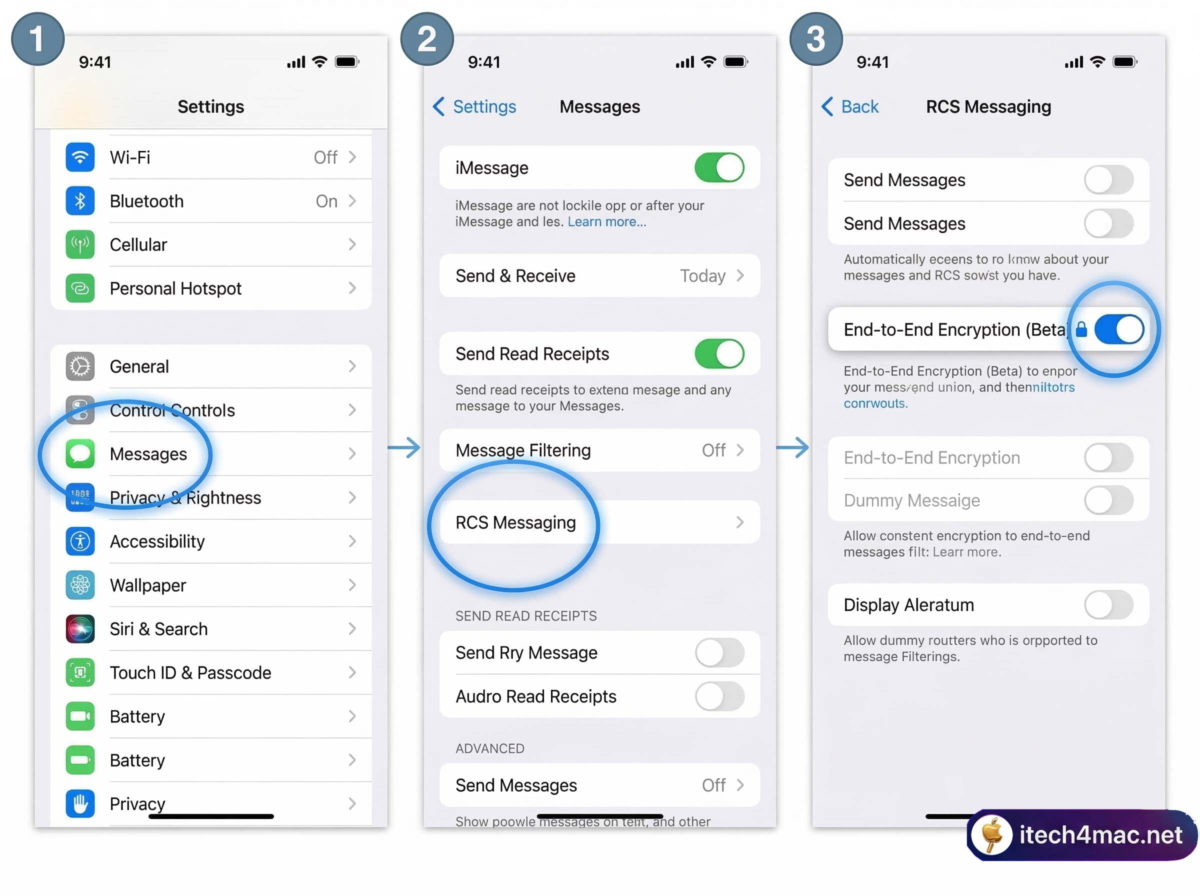
Settings → Messages → RCS Messaging → Enable “End-to-End Encryption (Beta)”
On iPhone
-
1Open the Settings app.
Settings -
2Scroll down and tap Messages.
Settings → Messages -
3Tap RCS Messaging.
Settings → Messages → RCS Messaging -
4Confirm “End-to-End Encryption (Beta)” is toggled on — enabled by default in Beta 2.
End-to-End Encryption (Beta) → ON -
5Open a Messages thread with an Android contact. Look for the 🔒 lock icon — it confirms encryption is active for that conversation.
On Android
-
1Open the Google Play Store and go to the Google Messages app page.
-
2Scroll to the bottom and tap “Join the beta”. If already enrolled, make sure you’re on the latest beta version.
-
3Wait for the update to install, then open Google Messages.
-
4Open a chat with your iPhone contact running iOS 26.4 Beta 2. Once connected, a 🔒 lock icon appears in the thread on both sides.
Carrier availability matters. Not all carriers support RCS encryption yet. If you don’t see the lock icon, your carrier may not be part of the initial rollout. Availability is staged gradually.
Beta bugs are expected. Apple’s release notes warn of possible message delivery delays and service interruptions. Don’t rely on this for critical communications just yet.
How Does the Encryption Actually Work?
The standard powering this is Messaging Layer Security (MLS), published by the IETF. MLS was designed specifically to solve end-to-end encryption across different clients and platforms — exactly the scenario where iPhone and Android need to agree on encryption keys without trusting a shared server.
This sits within the broader wave of AI and security improvements Apple has been rolling out in 2026. If you’re exploring what else is new, our 30 Mac productivity and AI tricks guide covers many of the new iOS 26 and macOS Tahoe features in depth.
Encrypted on your device
Your message is encrypted before it ever leaves your phone — not by the carrier’s server.
Nobody in the middle can read it
Even Apple, Google, your carrier, or any network operator cannot read the content in transit.
Decrypted only on the recipient’s device
Only the person you’re texting can decrypt and read the message.
The lock icon is your signal. When you see 🔒 in an RCS chat, the conversation is fully end-to-end encrypted. No lock = not yet encrypted for that thread.
Messaging Encryption: Full Comparison
| Messaging Type | E2E Encrypted? | Protocol | Status |
|---|---|---|---|
| iMessage (iPhone ↔ iPhone) | ✅ Yes | Apple PQ3 | Available since 2011 |
| Google Messages (Android ↔ Android) | ✅ Yes | Signal Protocol | Available for years |
| RCS (iPhone ↔ Android) — with E2EE | 🔵 In Beta | MLS / RCS UP 3.0 | Beta now; public rollout TBA |
| RCS (iPhone ↔ Android) — current public | ❌ No | RCS UP 2.4 | Current public release |
| SMS (any ↔ any) | ❌ No | SMS | Never encrypted |
| WhatsApp (any ↔ any) | ✅ Yes | Signal Protocol | Available, requires app |
| Signal (any ↔ any) | ✅ Yes | Signal Protocol | Available, requires app |
What Changes — and What Doesn’t
Your iPhone-to-Android messages will eventually become as private as iMessage. Sensitive conversations — family matters, financial info, medical details — will travel encrypted from one phone to the other, with no extra app needed.
Green bubbles are not going away. RCS encryption does not change bubble colors. Android contacts stay green; iMessage stays blue. The only visual difference is the 🔒 lock icon. If anyone in a group chat is not on a supported device or carrier, encryption may not apply to that whole thread.
RCS Universal Profile 3.0 also brings other long-awaited features: the ability to edit sent messages, delete messages, and reply to specific messages inline. These extras are part of the same standard upgrade and are expected to arrive together.
Not shipping in iOS 26.4 final. Apple confirmed this feature is testing-only and will arrive in “a future iOS, iPadOS, macOS, and watchOS 26 release.” Expect iOS 26.5 or a later point release. Follow all iOS 26 updates on itech4mac to stay notified.
Who Can Test It Right Now?
-
📱iPhone: Enrolled in the Apple Developer Program and running iOS 26.4 Developer Beta 2 or later.
-
🤖Android: Enrolled in the Google Messages Beta program with the latest beta version installed.
-
📶Carrier: Both devices must be on RCS-supporting carriers. Not all carriers are part of the initial E2EE rollout.
-
🌍Region: Availability is rolling out gradually and not yet confirmed for all markets simultaneously.
When this ships publicly in a future iOS 26 update, it will be enabled by default — no action required on your part. This is the same approach Apple used when rolling out other major iPhone features.
Frequently Asked Questions
Will encrypted RCS work for group chats?
Group encryption is more complex. For a thread to be fully encrypted, all participants must be on supported devices and carriers. If even one person falls back to SMS, the thread cannot be end-to-end encrypted. Apple hasn’t detailed a specific group chat timeline beyond confirming it’s coming.
My carrier doesn’t support RCS. What happens?
Messages fall back to standard SMS/MMS — no encryption, no typing indicators, no read receipts. RCS encryption only applies to conversations that travel over an RCS connection. Carrier support is expanding but not yet universal.
Is this the same as iMessage encryption?
No. iMessage uses Apple’s own PQ3 protocol (post-quantum resistant). RCS uses Messaging Layer Security (MLS), adopted by the GSMA in RCS Universal Profile 3.0. Both are end-to-end encrypted — the underlying technology differs, but the practical result is the same: nobody in the middle can read your messages.
Do green bubbles turn blue when encrypted?
No. Apple confirmed bubble colors are tied to the protocol — blue for iMessage, green for RCS and SMS. Encryption does not change bubble color. The only indicator is the 🔒 lock icon in the conversation thread.
When will regular users get this?
Apple says it will arrive in “a future iOS, iPadOS, macOS, and watchOS 26 release.” It won’t be in the final public iOS 26.4. Based on Apple’s typical cadence, iOS 26.5 or beyond later in 2026 is the most likely window. It will be on by default when it ships.
Does enabling this encrypt my existing messages?
No. The toggle only applies to new messages sent after the encrypted connection is established. Your existing message history remains as-is.
Should I still use Signal or WhatsApp?
For maximum security today, Signal remains the gold standard — open-source and independently audited. WhatsApp is convenient and widely adopted. Encrypted RCS will be excellent for everyday conversations once it ships publicly, but depends on carrier support. All three options complement each other.
The Bottom Line
This is one of the more meaningful privacy improvements in mainstream mobile messaging in years. For the first time, iOS and Android are working toward a shared encrypted messaging standard without requiring users to download anything extra or change how they communicate.
The beta phase is doing exactly what it should — finding edge cases, testing carrier compatibility, and ironing out bugs before this reaches hundreds of millions of people. The fact that Apple and Google are using an open standard (MLS) rather than a proprietary one bodes well for long-term cross-platform privacy.
If you’re a developer, test it now and report issues. If you’re a regular user, watch for this to land quietly in a future iOS 26 update — enabled by default, no setup needed. Just look for that lock icon in your green-bubble chats.
We’ll update this article as Apple moves E2EE RCS closer to a public release. Follow the itech4mac News section and our YouTube channel for the latest iOS 26 coverage.





1 thought on “iPhone-to-Android Encrypted RCS Texts Are Finally Here – How to Enable It?”