How to Fix “npm install failed; cleaning up and retrying”?
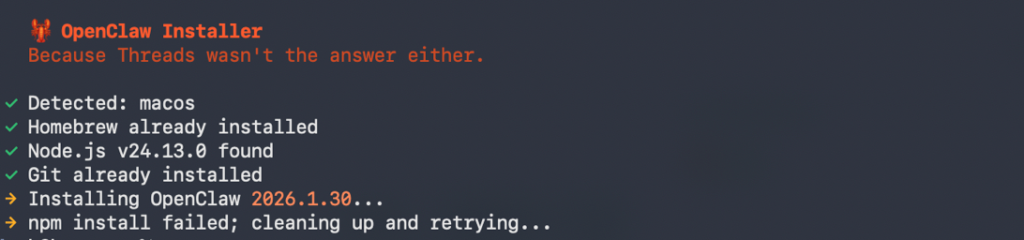
You are trying to install OpenClow (or a similar heavy package), and your terminal is stuck in a loop. It downloads, fails, says cleaning up and retrying, and eventually crashes with a massive error log.
This error is rarely about the code itself. It is almost always about Node’s package manager choking on a bad network connection or a corrupted cache file.
Here is the step-by-step “Correct Fix” to resolve this permanently.

How to Fix “npm install failed; cleaning up and retrying” During OpenClow Installation
Phase 1: The “Nuclear” Clean (Do This First)
Before we try to install again, we need to remove the “ghosts” of the failed installation. If you don’t do this, the new install will just trip over the old corrupted files.
1. Open your Terminal. 2. Navigate to your project folder:
Bash
cd /path/to/openclow
3. Run this command sequence to wipe everything:
Bash
rm -rf node_modules
rm package-lock.json
npm cache clean --force
rm -rf node_modules: Deletes the folder where packages are stored.rm package-lock.json: Deletes the “receipt” of exactly which versions were installed. We want to generate a fresh one.npm cache clean --force: This is crucial. It clears the local NPM cache on your machine which likely holds the corrupted file causing the “cleaning up” loop.
Phase 2: The Configuration Fix (The Secret Sauce)
The cleaning up and retrying error is often triggered because NPM gives up on a download too quickly. We need to tell NPM to relax its timeout limits.
1. Increase the network timeout: Run this command to tell NPM to wait longer before failing:
Bash
npm config set fetch-retry-maxtimeout 120000
npm config set fetch-retry-mintimeout 20000
2. Turn off strict SSL (Optional but helpful): If you are on a corporate network or a restricted ISP, SSL certificates can sometimes cause the download to hang.
Bash
npm config set strict-ssl false
Phase 3: The “Robust” Install
Now that the environment is clean and the settings are optimized, we run the install command. But we don’t just run npm install. We use flags to prevent conflicts.
Run this exact command:
Bash
npm install --no-audit --legacy-peer-deps
--no-audit: Skips the security audit step during install, which saves time and network bandwidth.--legacy-peer-deps: This is the magic flag. If OpenClow has dependencies that are slightly older than what your Node version expects, this flag tells NPM to “ignore the conflict and install it anyway.”
If it still fails: Try using a different registry mirror (sometimes the main NPM registry is down or slow in your region):
Bash
npm config set registry https://registry.npmjs.org/
npm install
Summary of Commands (Copy-Paste Block)
If you want to do it all in one go, copy and paste this entire block into your terminal:
Bash
# 1. Clean the environment
rm -rf node_modules
rm package-lock.json
npm cache clean --force

# 2. Configure network settings to prevent timeouts
npm config set fetch-retry-maxtimeout 600000
npm config set fetch-timeout 600000

# 3. Install with conflict resolution
npm install --legacy-peer-deps
References & Further Reading
If you want to understand the technical details behind why these commands work, here are the official documentation links:
- NPM Cache Clean Documentation: Explains why forcing a cache clean is necessary for corrupted tarballs.
- Legacy Peer Deps Explanation: Detailed StackOverflow discussion on why this flag fixes 90% of modern install errors.
- NPM Config Settings: Official list of all config settings including timeouts.




